
Rent Giant iTabs for Trade-Shows and other Events
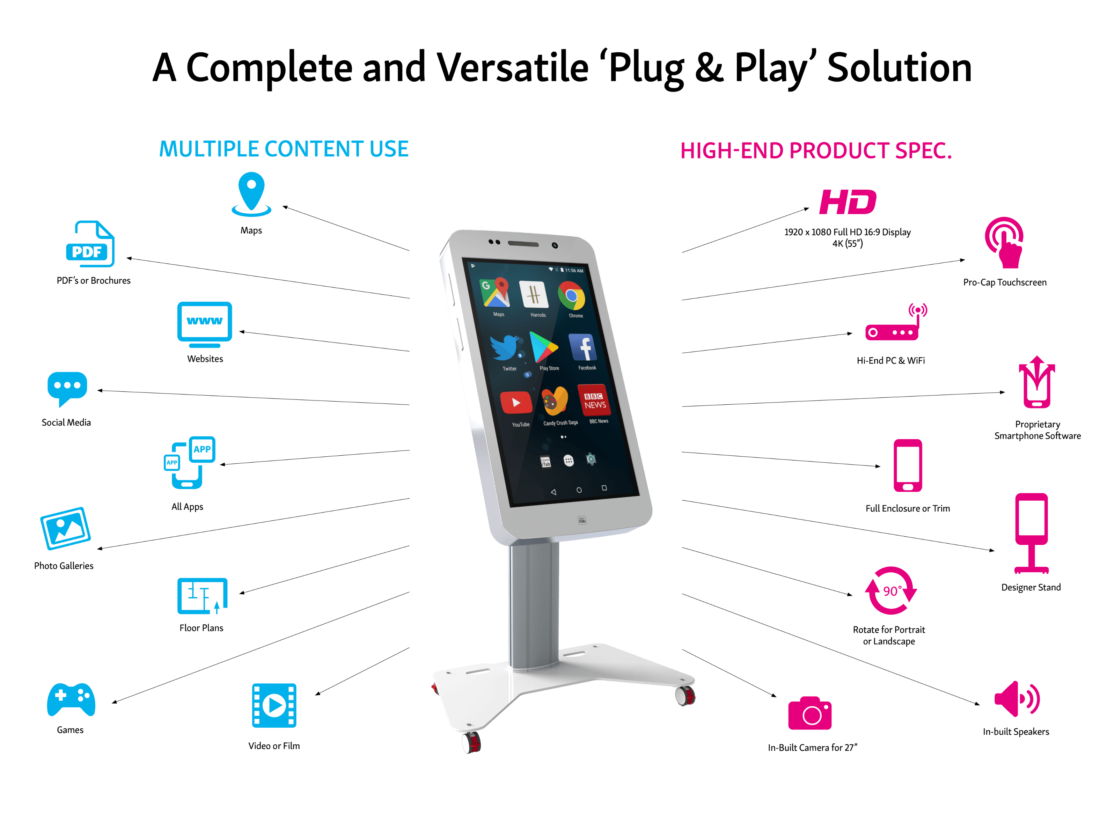
Our SmartPhones perfectly mimic the design aesthetic of today’s popular handheld devices and offer additional security for safe storage of the PC and cabling, preventing interference in unattended public spaces. Showcase all your digital content including websites, multimedia, Apps in native format, and much more.
Giant iTabs are perfect for businesses who want to offer a branded, self-guided digital experience. From lobby displays and trade show booths to check-in stations, these touchscreens draw attention and deliver information without the need for on-site staff.
App/Content Development and Testing
Capable of running websites and Apps in their native format direct from the Google Playstore or partial build from Apk files, Giant iTabs can showcase websites and mobile apps perfectly exactly as the designers intended.
With all the usual touch, swipe, pinch, gestures, and functionality of your hand-held devices, they are frequently used in tech, innovation, and development labs for group testing and presentation as part of the app or content build process, transforming the single user device into a group experience.
Giant iTab Hire for Corporate and Business Events
Rent Giant Tablet from Tablet Hire and transform your event with interactive displays that leave a lasting impression.
For product-focused businesses, giant phone displays deliver an unforgettable visual impact.
Whether you’re showcasing an app, presenting to investors, or capturing attention at events, our giant iPhone screen rentals ensure maximum visibility and clarity where it matters most.
- 27 Giant Smartphone Landscape
- 27 Giant Smartphone Portrait
- 42 Giant iTab SmartPhone HR
- 55 Giant iTab SmartPhone HR
Event Tablet Rentals Made Easy
Enhance interactivity with tablet rental and iPad stands rental, perfect to captivate attendees. From giant iTab displays to bulk iPad hire and tablet accessories, we’ve got everything you need to power your next event.
- Easy to use
- Intuitive to set up
- All information in one place
- Unique experience
- fully customizable
- Kiosk mode
- Save money, no prints need
- Software Licence
- Sustainable for Android or iOS
Why Rent Giant iTabs for Events
Why Rent Giant iTabs for EventsLive Demos, Teaching and Training
Interactive screens offer an extremely versatile form of presentation coupled with the ability to source, from a simple touch, a vast array of digital content from speeches to pictures to videos and even live feeds.
Demonstrated by the growing number of broadcasters using interactive touchscreens and Giant iTabs live on air for their TV shows and Live broadcast or seminar presentations. At Tablet Hire, we handle the setup for you by preloading your apps, websites, videos, and presentations before delivery.
Banking, Rental, Corporate, and Gaming
From boardroom pitches to customer experience centers and digital concierge solutions, Giant iTabs are able to showcase all your digital content from one single device acting as a perfect sales, presentation, or collaboration tool.
With their ability to reproduce exactly the same mobile or tablet experience, but on a larger scale, they are perfect for presenting games and mobile commerce solutions to customers or colleagues where the normal hand-held devices are just too small.
Education, Health, Teaching, and Training
Schools, colleges, academies and training centers all benefit from Giant iPad rentals to present education and training sessions with added interaction. With the ability to download apps from the Google Playstore, schools, and education departments are able to load the Giant iTab with a whole host of different teaching and training apps from 3rd party developers.
Add some teaching games and you have the perfect solution to create an effective and enjoyable learning environment. With Tablet Hire, you get expert support, and attention-grabbing tech that stands out.
Leatest posts
Leatest postsEvent Printer Troubleshooting: Quick Fixes
At live events, time is huge factor – and the last thing you want is a printer glitch delaying schedules, badge printing, or essential documents. Whether you’re running a small conference booth or managing a large-scale expo, printer issues can cause unnecessary stress.
Read MoreHow to Make Keyboard Bigger on iPad
How to make keyboard bigger on iPad is a common question for many users. Whether you’re typing emails, taking notes, or just texting, a small keyboard can slow you down.
Read MoreHow to Put Your iPad in Recovery Mode
Having issues with an unresponsive iPad and not sure how to put it into recovery mode? You’re in the right place. In this guide, we’ll walk you through the steps to fix common issues and help get your iPad updated and working again.
Read MoreFeedback
FeedbackWhat our clients are saying about us
01
This will be the 3rd or 4th time that we’ve used Tekk after meeting both the Lucy’s at Canfex in 2021. Not only has the service been great, but the pricing has blown our clients away.
02
We often require multiple iPad for delivery and collection. Tekk Group are always prompt and very flexible in adjusting or extending hires at short notice to suit our client requirements, while still providing excellent value.
03
Our event was a great success and we can only thank you guys for supplying us whit the additional iPads we needed. It was surely a day to remember, we smashed all previous records for merch stores.